
Room-first scheduling for UK GP practices
Stop planning around spreadsheets. ClinicGrid builds your week plan around your rooms, the real constraint. Built for practice managers who know their building.
Recruiting 4 more UK GP practices for our founding cohort · 2 months free from go-live, then a 30% lifetime discount
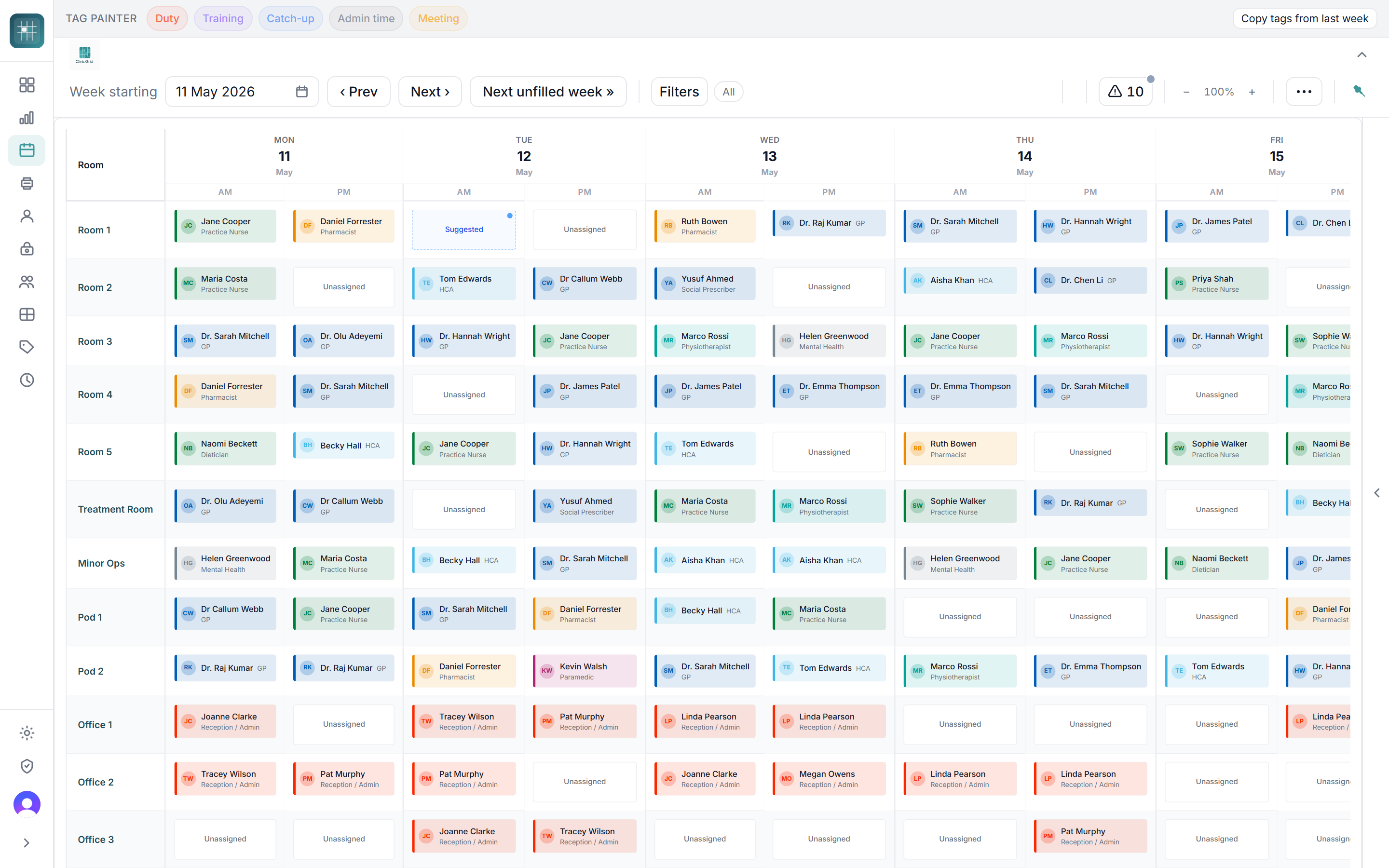
Watch the 3-minute tour
Rooms, staff, leave, autofill, print and locums: the whole week, start to finish.
Built inside a working practice
ClinicGrid was made by an Advanced Paramedic Practitioner who works clinically in a Cornish GP surgery. It started with watching the practice’s assistant practice manager and estates lead do room planning the hard way: squeezing use out of every room, fitting every member of staff in, avoiding double bookings, and finding somewhere for the locum to work on the day. It has been built slowly since 2025, every feature shaped by that person’s feedback, week by week. ClinicGrid holds no patient data and never will.
Everything you need to plan a working week
From room setup to a printed daily plan, ClinicGrid handles the operational layer so your team can focus on care.
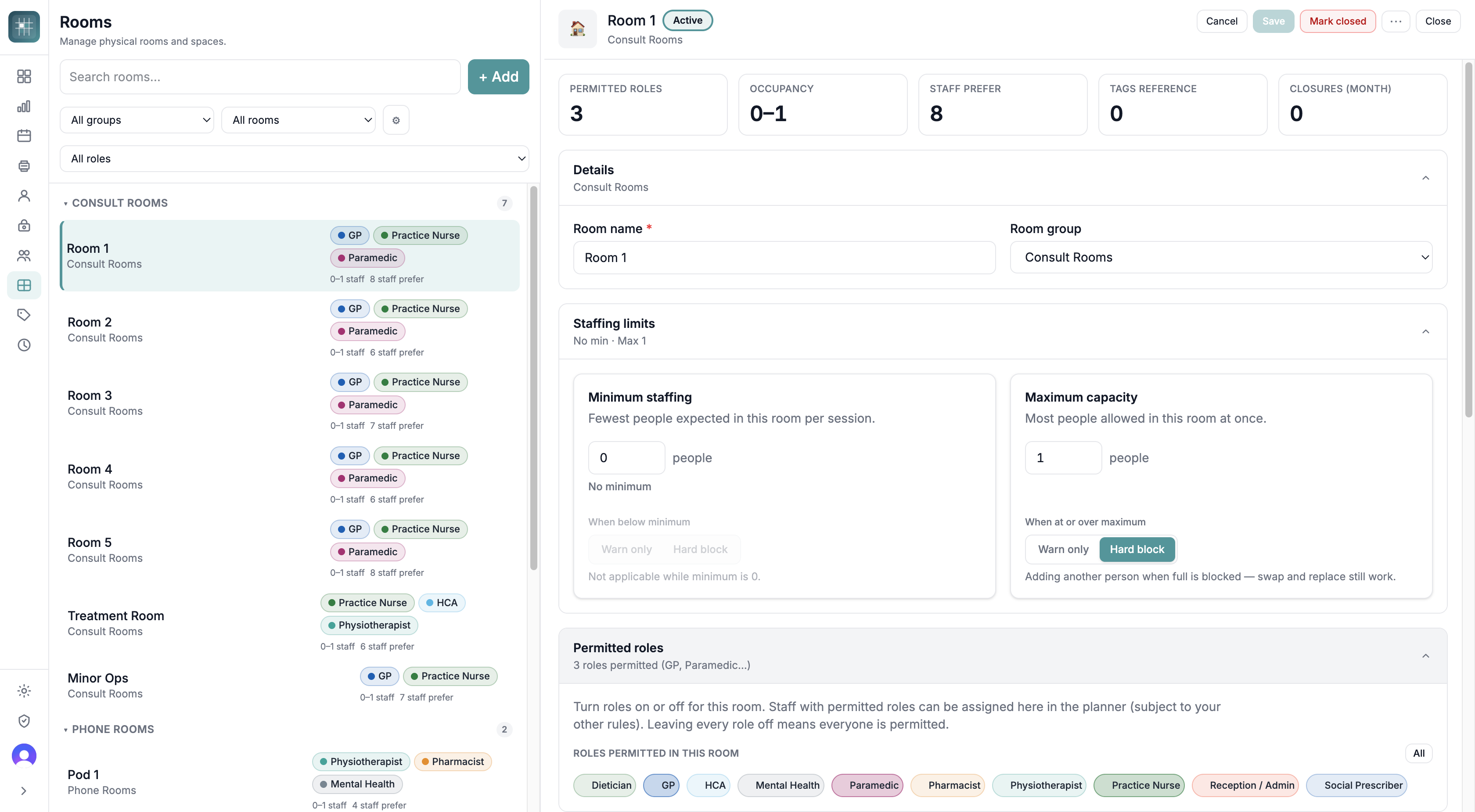
Your building, properly modelled
Define every consulting room, nurse room and treatment bay across all your sites. Per-room staffing limits, permitted roles, room groups and closures, so the planner and autofill work to your real building, not a generic grid.
- Multi-site and multi-building support
- Per-room min/max staffing with warn or hard-block
- Permitted roles per room and staff prefer counts
- Mark rooms out of action with closure tracking
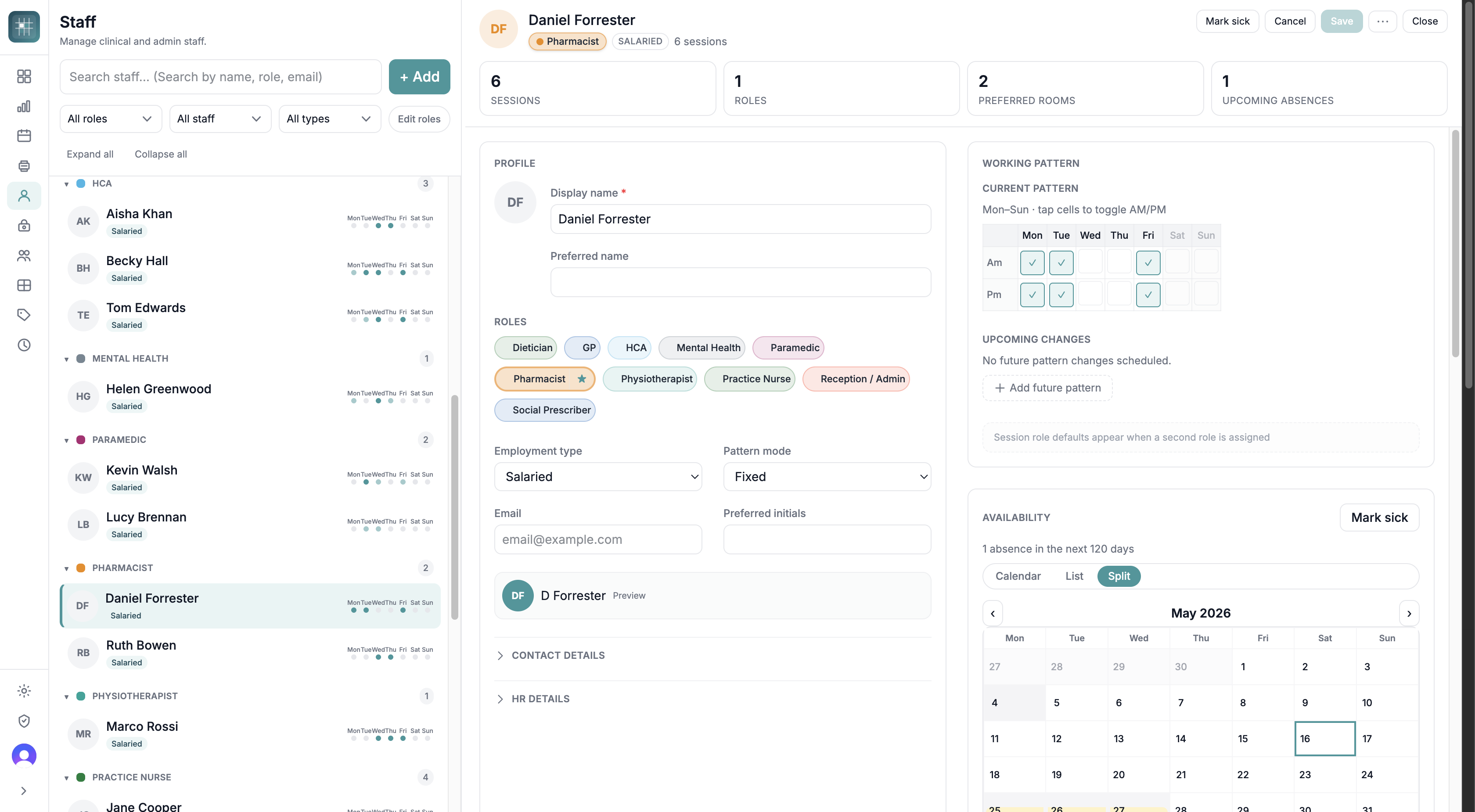
Every clinician, every working pattern
Keep your full clinical and non-clinical team in one place. Each person has their roles, contract type, AM/PM working pattern and absences, and the planner uses all of it.
- GPs, nurses, ACPs, HCAs, admin and more, with primary role and secondary roles
- Salaried, partner and locum contract types
- AM/PM working pattern grid with future pattern changes
- Per-person availability calendar: leave, training, sickness
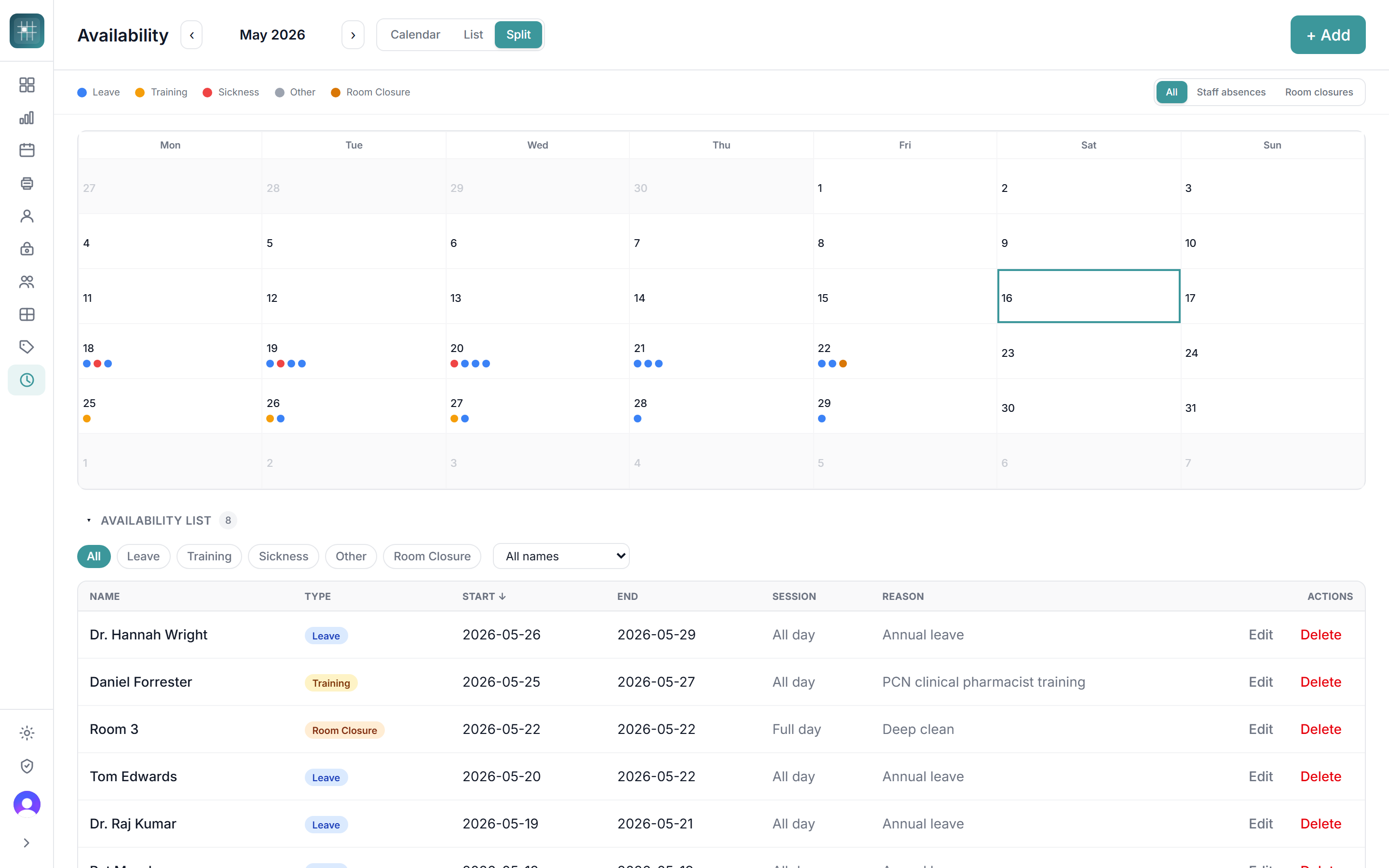
Leave, sickness and room closures in one view
Track annual leave, training, sickness and room closures on a single calendar. The week plan reflects absences automatically, so you can see exactly where cover is needed.
- Leave, training, sickness and room closure types
- Month, list and split views
- Drives cover and locum requests downstream
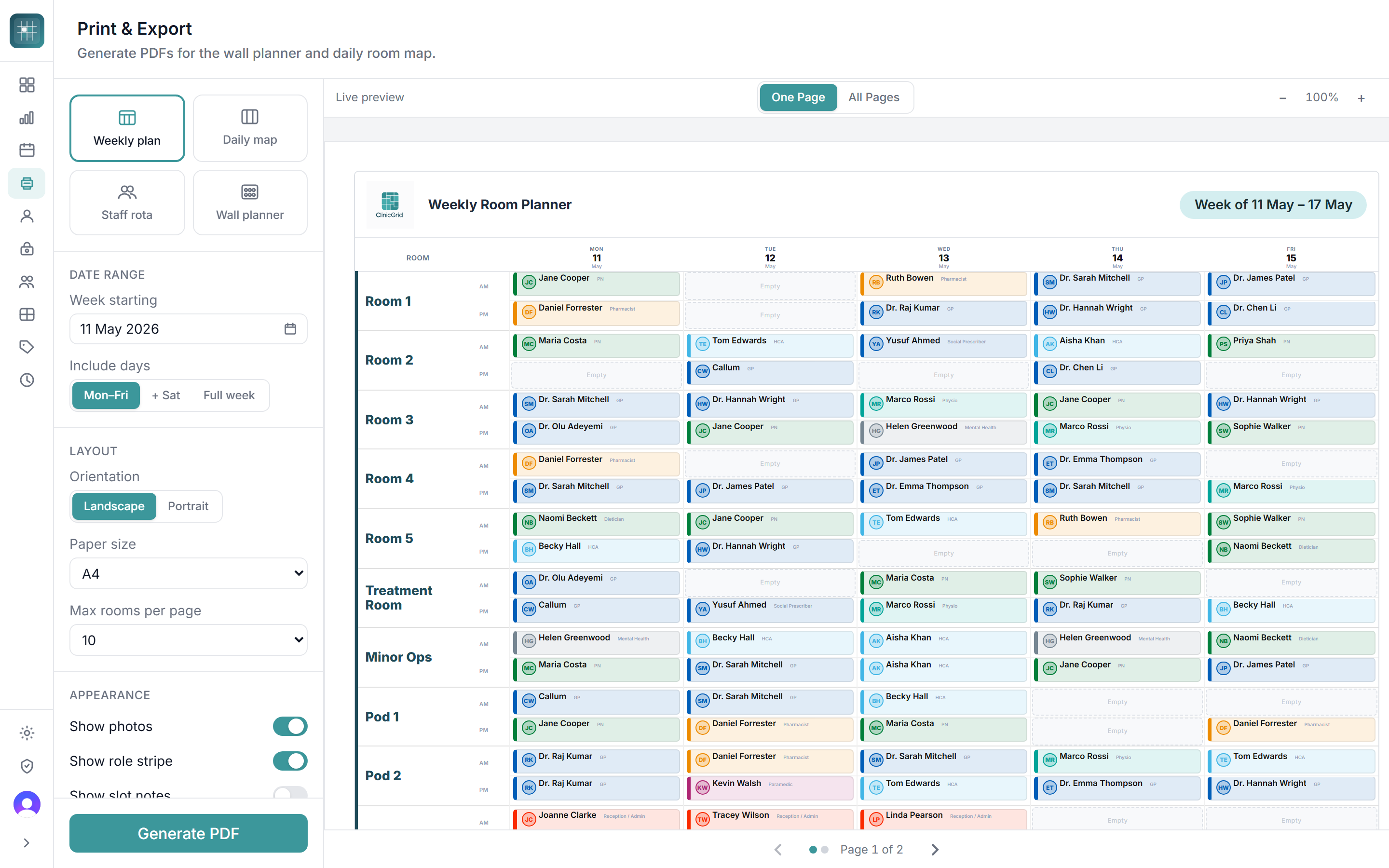
Print-ready plans for the practice
Generate clean PDFs for the wall planner, daily room map, staff rota and waiting room. Choose A4 portrait or landscape, set the date range, and ClinicGrid handles the layout.
- Weekly plan, daily map, staff rota and wall planner
- Live preview as you tweak options
- NHS-themed output for clinical waiting areas
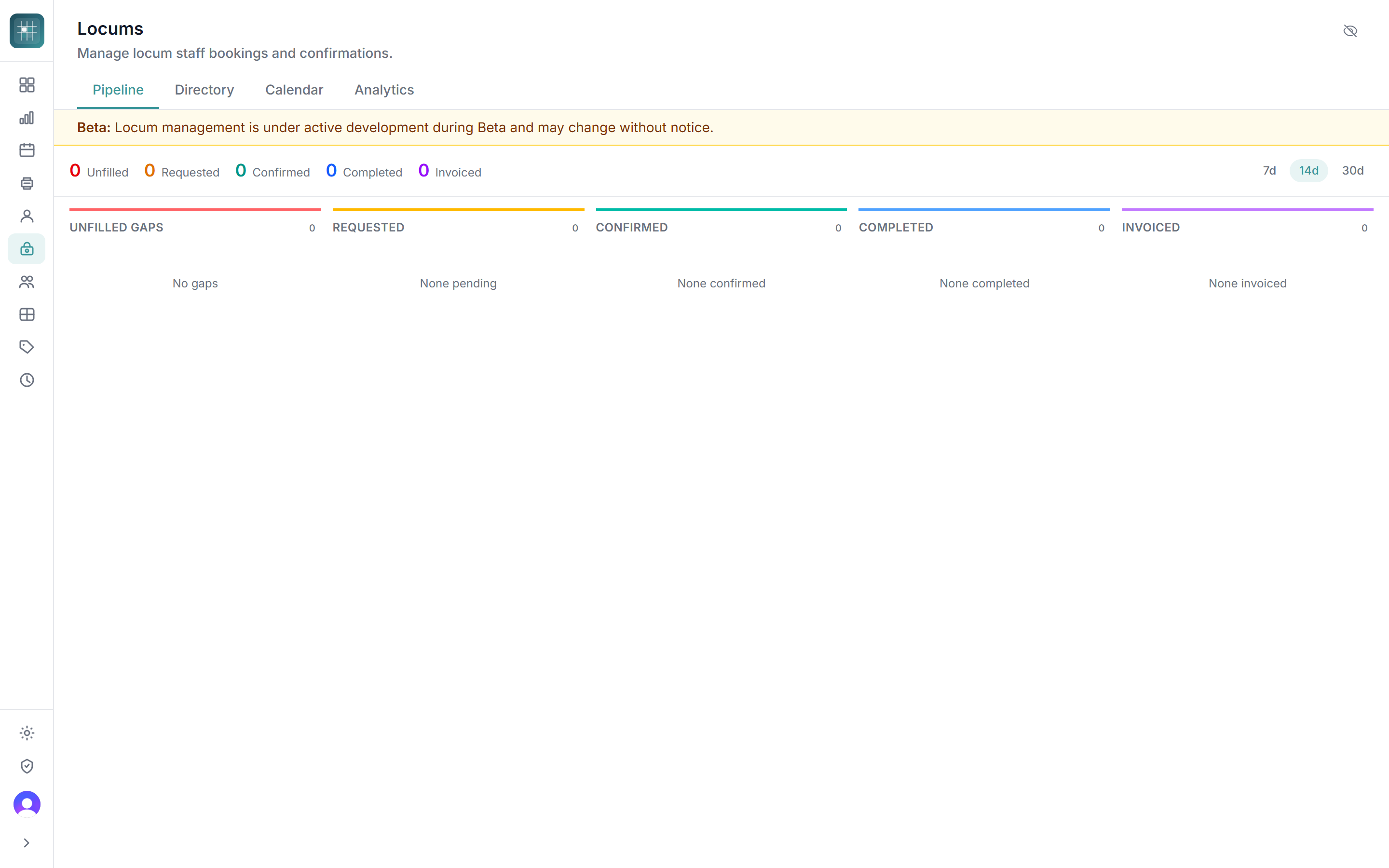
Fill the gaps without the spreadsheet
Every practice gets a full locum pipeline: unfilled gaps, requested, confirmed, completed and invoiced. Cover sessions are never an afterthought. No add-on, no higher tier.
- Pipeline view of every locum session
- Locum directory shared across your practices
- Magic-link portal for locums to confirm bookings
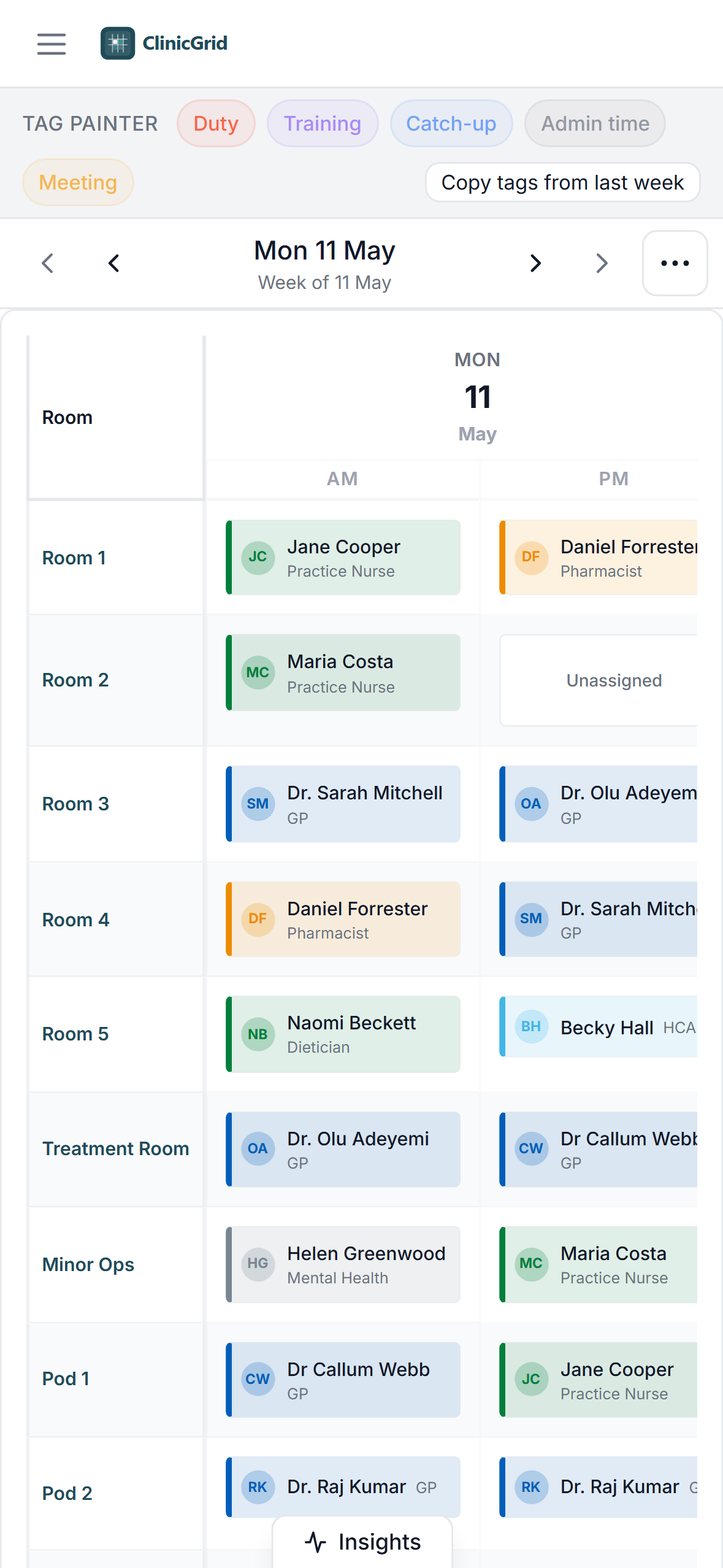
The plan on your phone, ready for the day
Pull up today's room map on a phone or tablet at the start of the day. Same data as the desktop view, optimised for quick glances at reception or in the corridor.
- Day view tuned for small screens
- Tag painter and tag pills on mobile
- No app to install: opens in the browser
Why join the closed Beta?
We're recruiting 4 more UK GP practices for our founding Beta cohort. You don't just get early software. You shape what ClinicGrid becomes (pricing included), get 2 months free from go-live, and lock in a 30% lifetime discount.
Shape the product
Direct line to the team. We ask Beta partners for feedback on every release, and on how we price ClinicGrid, then ship the changes that matter most to practices like yours.
Early access
Use ClinicGrid months before general availability. More time to embed it in your week-planning routine and influence features while they're still being built.
2 months free, then 30% off for life
Use ClinicGrid free for your first two months after go-live (the clock starts once we've set you up together, not at signup) while you embed it into your week-planning routine. After that, founding Beta partners keep a 30% lifetime discount on whatever the current price is, billed monthly or annually, for as long as you're a ClinicGrid customer. A thank-you for taking the risk with us early.
4 founding spots · UK GP practices only · No commitment to request access
Frequently asked questions
How do I get into the Beta?
ClinicGrid is currently in closed Beta and we're recruiting 4 more UK GP practices for our founding cohort. Founding Beta partners get 2 months free from go-live (the clock starts when you begin planning for real after onboarding, not at signup), then keep a 30% lifetime discount on whatever the price is at the time of billing. Fill in the expression of interest form with your practice details and we'll be in touch.
What's expected of Beta partners?
The closed Beta is a real partnership. Founding Beta partners get their first two months after go-live free, but we're looking for practices willing to engage seriously and shape the product, not just kick the tyres. We're planning for roughly ~3 months of active engagement per practice. The free period covers the first two months; from month 3 onwards you're on a paid subscription at the founding rate (monthly or annual, your choice) while the remaining check-ins and the final review carry on. In exchange for the free period, lifetime discount and early access, we ask that you:
- Help us set you up properly. Block 1–2 hours with the founder for onboarding, configuring your rooms, staff and working patterns. Bad setup data tanks the Beta for everyone.
- Nominate a primary contact (usually the practice manager). A single point of accountability inside the practice keeps feedback coherent and avoids us getting fragmented signals from different roles.
- Actually use ClinicGrid for real week planning, not just kick the tyres.
- Try preview features in low-stakes weeks. When we ship something experimental, give it a real run during a quieter week so we get useful signal before it goes to everyone.
- Report bugs as you find them via the in-app bug reporter. Quick screenshots and a sentence of context are gold.
- Fill in five short feedback check-ins at day 3, 2 weeks, 1 month, 2 months and a final 3-month review. Each is a mix of quick ratings and a few open questions, roughly 5 minutes. They show up automatically in the app and as an email reminder.
- Two Teams calls with the founder: one at the 1-month mark and a longer final review at 3 months (30–45 minutes, video, scheduled to suit you). We arrange these directly by email.
- On-call support for blockers. Hit the in-app help button or email and you'll get a founder reply within 1 working day for anything blocking your week plan, and within 2–3 working days for general questions and feature requests. Scheduled calls (above) are the main forum for deeper discussion.
- Tolerate some rough edges. Early Beta means occasional UI weirdness, missing features, and the odd thing breaking. The trade-off is a direct line to the team and real influence over what gets built next.
- Be candid. "This is annoying" or "we'd never use this" is more useful to us than polite agreement. Beta partners shape the roadmap, and telling us what's broken or missing is the whole point.
Once you're settled and ClinicGrid is clicking for you, we'd also love it if you'd consider taking 1–2 short reference calls per quarter from prospective practices near general availability, and letting us feature your practice as a case study (always with your prior approval on every quote and logo use). Both fully optional and never a condition of staying in the Beta.
You can leave the Beta at any time, no notice required. We won't pester you, but if you go quiet for a few months we may release your spot to the next practice on the list.
How much will ClinicGrid cost?
One flat plan with every feature included, with no tiers and no per-feature add-ons: £120/month month-to-month, or £1,200/year billed annually (£100/month, two months free, a 17% saving).
Your subscription covers one site: one building with its own room list. Each additional branch or satellite site is £20/month or £200/year (£14/month or £140/year for founding practices).
Founding Beta partners get 2 months free from go-live (after onboarding, not from signup). From month 3 you choose how to pay, both with the 30% lifetime discount: £84/month month-to-month, or £840/year billed annually (£70/month).
For example, a founding practice with one site pays £84/month. With a main site and 2 branches it's £84 + £28 = £112/month, or £840 + £280 = £1,120/year.
Buying for several practices in a PCN? Get in touch for PCN pricing.
We genuinely want Beta feedback on pricing. If practices tell us the rate's too high, too low, or structured the wrong way, we'll revisit it before general availability. The 30% lifetime discount tracks whatever we land on.
Is ClinicGrid an appointment booking system?
No. ClinicGrid is operational planning software for practice staff. It helps you decide which rooms are in use, who is in them, and what clinics are running, before patient bookings happen. It does not store patient data.
Is ClinicGrid a staff rota system?
ClinicGrid is a room-first rota. It plans which room each clinician is in for every AM and PM session, alongside working patterns, leave and locum cover, so the whole week is on one screen. It replaces the paper wall planner and the room spreadsheet. It isn't an HR or payroll system.
We don't have enough rooms for our ARRS team. Can ClinicGrid help?
ClinicGrid can't add rooms, but it shows every room and every AM and PM session across your sites on one screen. Free sessions are easy to spot, and room rules (permitted roles and staffing limits) warn you, or block the change, if a pharmacist, paramedic, physician associate or anyone else is placed in a room their role can't use.
Can we still print a wall planner?
Yes. ClinicGrid produces print-ready PDFs of the weekly plan, the daily room map, the staff rota and the wall planner, in A4 portrait or landscape. The printed plan is often what the team actually looks at, so printing is built in, not an afterthought.
Does ClinicGrid manage locums?
Yes, and it's included in every plan. Unfilled sessions move through a pipeline (locum needed, requested, confirmed, completed and invoiced) and locums confirm bookings through a secure magic link.
Does it work across branch surgeries?
Yes. Set up each site's rooms separately and plan across them in one place. Your subscription covers one site; each additional branch or satellite site is £20/month or £200/year.
Does it integrate with EMIS, SystmOne or Vision?
Not yet. ClinicGrid currently works as a standalone operational planning layer alongside your clinical system. Integrations are on the roadmap.
Is patient data stored?
No. ClinicGrid never stores patient-identifiable information. It is purely operational: rooms, staff and clinic types only.
Can I use it for a PCN or federation?
Yes. ClinicGrid supports multi-site views suitable for PCN-level oversight. Contact us to discuss your needs.
Is ClinicGrid compliant with NHS data standards?
ClinicGrid stores no patient data, so clinical data governance requirements don't apply in the usual sense. We follow UK data protection law and our infrastructure runs on Cloudflare's European data centres.
Request closed Beta access
We're recruiting 4 more UK GP practices for our founding Beta cohort. Founding Beta partners get 2 months free from go-live, then keep a 30% lifetime discount. Leave your details and we'll be in touch. No commitment required.
Want early access to ClinicGrid?
We're recruiting 4 more UK GP practices for our founding Beta cohort. Founding partners get 2 months free from go-live, then keep a 30% lifetime discount.
Request Beta accessClosed Beta · UK GP practices only · 4 founding spots